Changelog
Track every update, improvement, and fix we make to our platform
HYPER SEARCH IMPROVEMENTS
Multiple enhancements to make AI-powered food search faster and more accurate.
Performance Boost
Hyper Search is now significantly faster, delivering results more quickly than before.
Volume Measurements
Improved support for volume-based measurements in search results, making it easier to find foods with serving sizes like cups, tablespoons, and fluid ounces.
Better Recipe Recognition
Enhanced Perplexity recipe service for more accurate recipe parsing and ingredient extraction.
Image Search Fixes
Resolved issues with AI image search to ensure more reliable nutrition fact extraction from photos.
FOOD SEARCH ENHANCEMENTS
Improvements to regular food search and recent foods functionality.
Extended Recent Search
Recent foods now show items from the last 120 days (up from 90 days), making it easier to find foods you've logged in the past.
Search Fixes
Fixed issues with meal search and recent food search to ensure more accurate results.
Nutrition Facts Drawer
Fixed drag handle behavior in the nutrition facts drawer for smoother interactions.
ACCOUNT IMPROVEMENTS
Better account management and security features.
Password Update Form
Improved update password form with better validation and user feedback.
FOOD DATABASE & NUTRITION TRACKING
Migrated to a custom food database with enhanced search capabilities and AI-powered features.
Custom Food Database
Transitioned from third-party API to our own custom food database, providing better search results, improved nutrition data, and enhanced reliability.
AI Image Search
Revolutionary AI-powered image recognition lets you snap a photo of food packaging to automatically extract nutrition facts. Works with Hyper Search for quick custom food creation.
Enhanced Food Data
Users can now improve food items by adding volume and weight measurements. Support for decimal ingredient quantities and custom units like 'per cookie' or 'per taquito'.
Improved Micronutrients
Better micronutrient data handling and display across all food and meal interfaces. Food Quantity Drawer now shows comprehensive micronutrient information when available.
CALORIC BALANCE & TDEE
New tools to track your deficit/surplus and understand your energy balance over time.
Deficit/Surplus Tracking
View your caloric deficit or surplus with breakdowns by day, week, and month. Displayed directly on the Planner page with visual indicators.
Meal Logging Toggle
New 'All meals logged' toggle helps the app distinguish between incomplete logging days and true low-calorie days, ensuring accurate deficit/surplus calculations.
Improved TDEE
Enhanced TDEE calculations that prevent future data leakage and provide more accurate energy expenditure estimates.
WORKOUT FEATURES
Enhanced workout tracking and template management capabilities.
Template Management
Duplicate templates, archive unused templates, and improved performance tracking. Performance page now excludes deleted workout events for cleaner analytics.
Improved Input
Redesigned weight/reps drawer with better UX. Rest timer converted to drawer format. Fixed workout form issues and improved slow connection handling.
PLANNER & CALENDAR
New monthly grid view and improved calendar management.
Monthly Grid View
Brand new monthly grid layout with multi-day event support. Overflow events drawer for busy days. Consistent grid layout across all devices.
Enhanced Navigation
Improved date navigation on Journal and Meals pages. More compact planner header. Better entry type filtering.
UI/UX IMPROVEMENTS
Hundreds of improvements to design, animations, and user experience.
Pro Theme Enhancements
Major visual improvements to Pro theme. Better legibility in dark mode. Cleaner, more professional appearance across all components.
Mobile Optimizations
Comprehensive safe area handling for iOS. Fixed drawer and sheet positioning issues. Better keyboard handling and bottom safe area insets.
Unified Components
Consistent sheet and drawer styling throughout the app. Improved animations and transitions. Better button styling and interactive feedback.
Navigation Updates
Improved bottom navigation styling, enhanced sidebar appearance, and more compact navigation elements.
TECHNICAL IMPROVEMENTS
Under-the-hood improvements for better performance and security.
Security & Logging
Comprehensive security audit and console log cleanup. Implemented production-safe logging system. Added Netlify secret scanner protection.
Bug Fixes
Fixed recipe sync issues, corrected nutrition calculations, resolved layout shifts, and improved data synchronization. Over 100 bug fixes included in this release.
Code Quality
Major refactoring of meal and recipe components. Better component organization and separation of concerns. Fixed numerous TypeScript errors.
MEALS & RECIPES
Complete overhaul of meal management with improved workflows and new features.
Meal Sheet Refactor
Rebuilt meal management interface with draft state support. All meal changes are now saved in draft mode before committing, preventing accidental data loss.
Recipe Management
Added public vs. private recipe distinction, recipe duplication, and improved editing workflow. Recipe edits now truly update existing recipes instead of creating duplicates.
Smart Meal Features
Add entire prior meals to new meals or recipes. Improved barcode lookup integration. Better handling of meal food item editing and deletion.
MEALS
Track your meals with the Edamam food database API, and a custom search solution for fast, relevant search results.
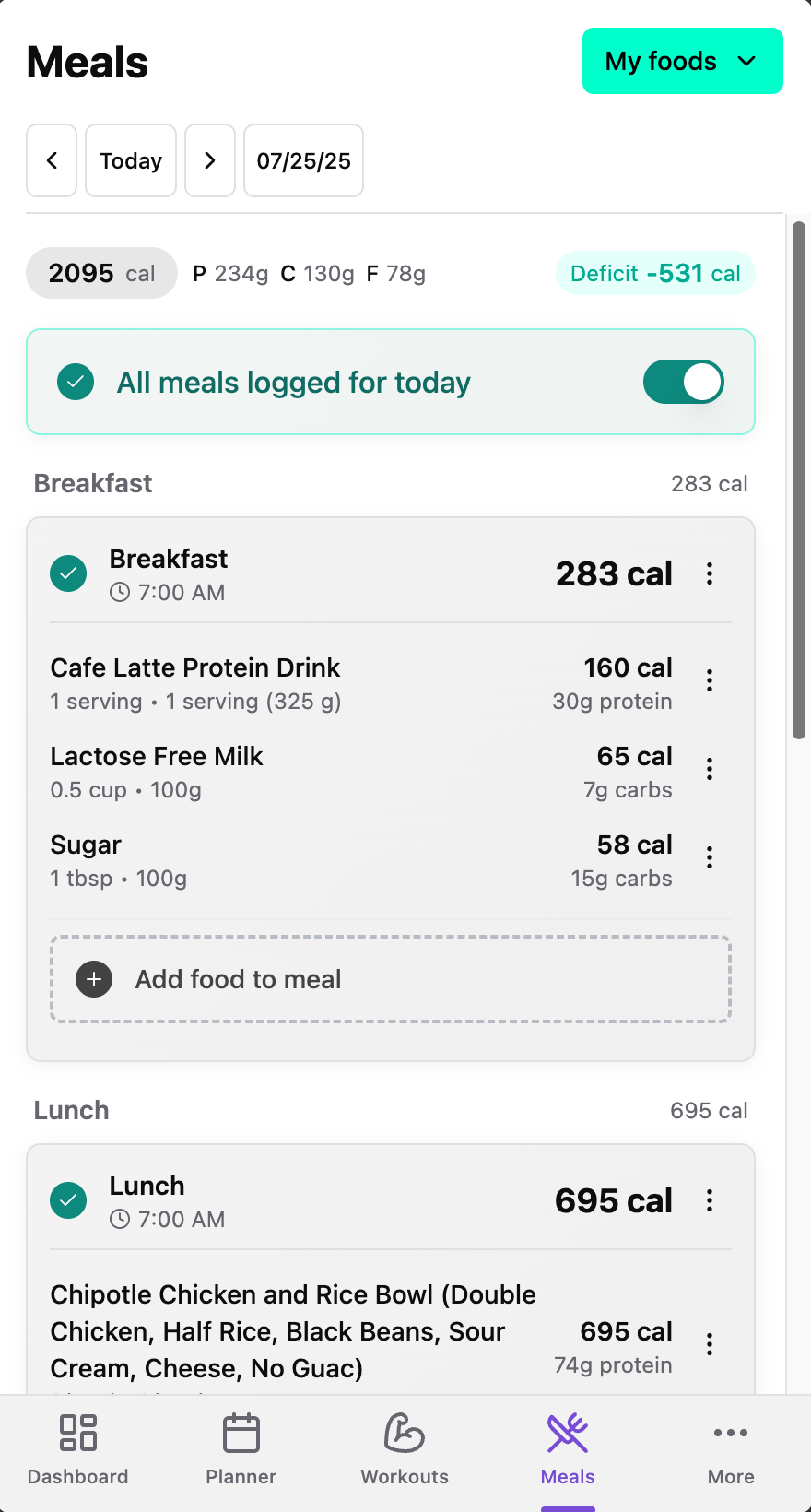
How to add meals
- • From the Meals page: In this update there's a brand new Meals page where you can easily view all of your meals for a day. Simply click Add food to meal under any of the meals (Breakfast, Lunch, Dinner or Snack).
- • Note that on the Meals page there is a toggle to indicate that you have logged all of your meals for the day. This toggle is important! If you don't check it, the application can't know the difference between a day on which you logged all of your meals, and one where you didn't, meaning that it can't know what your actual caloric deficit or surplus was on that day. Imagine that you logged only a single meal of 500 calories and forgot to log the rest, the app might think you're in a 2000 calorie deficit for that day without that toggle. With this toggle being OFF, we know that you simply did not log all of your meals, and thus it can't know your actual deficit or surplus.
- • Planner: Add meals from the Planner page. Click on the + button in the top right corner, then choose "Meal". If you want, you can choose to include the time of the meal. Then click Add food to meal. On this page, you can start searching through our database to find food items.
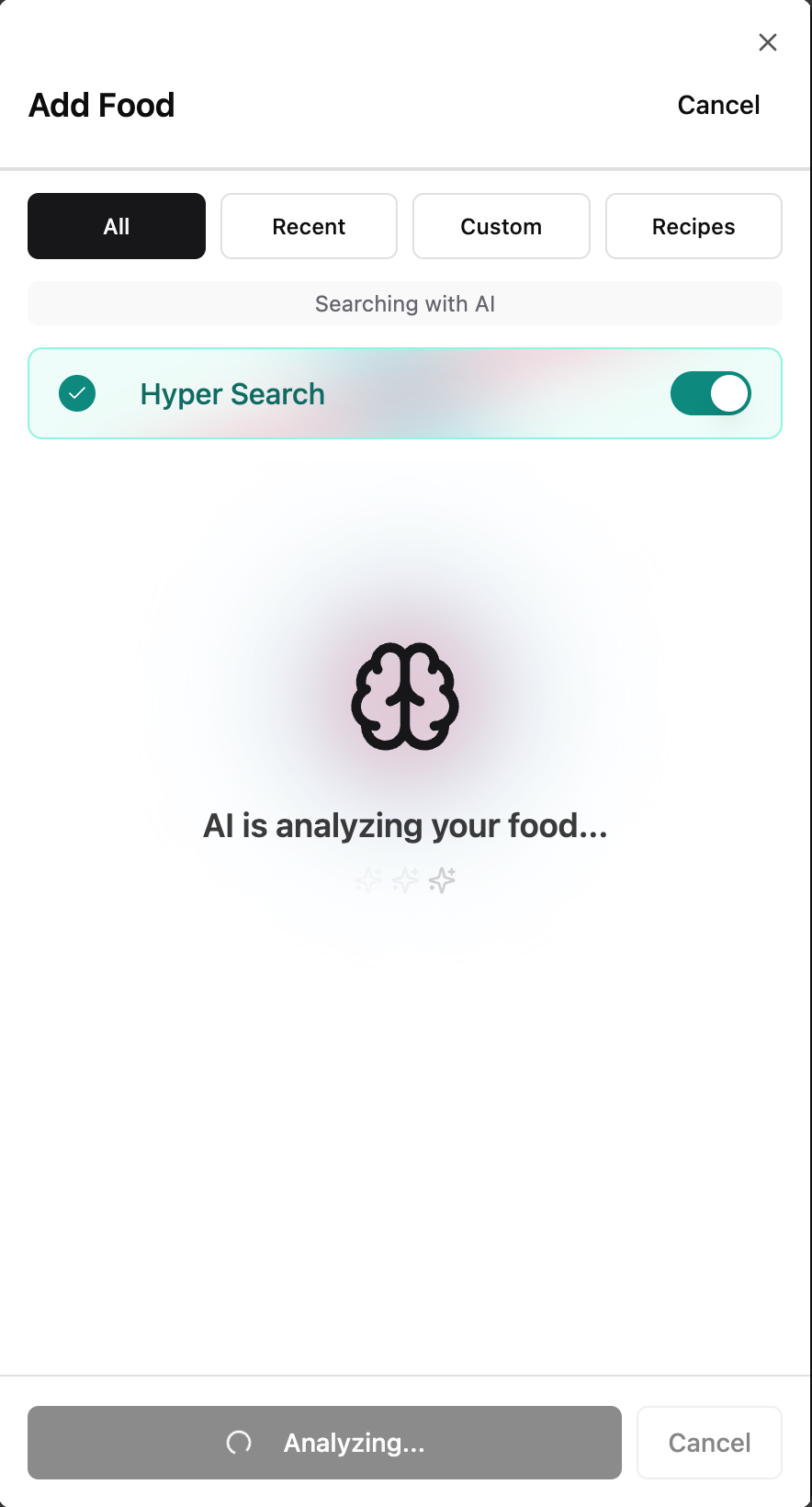
Introducing "Hyper Search"
Having trouble finding a food item in the database? Turn on Hyper Search and, with the power of AI, we'll try to find it, or a close match on the internet. If the AI engine isn't sure what you mean, it will present you with multiple options, and allow you to refine your search.
Barcode Lookup
Want to be sure you find exactly the right food? Type in the barcode's UPC, and if we can find it, we'll add it to your meal or recipe.
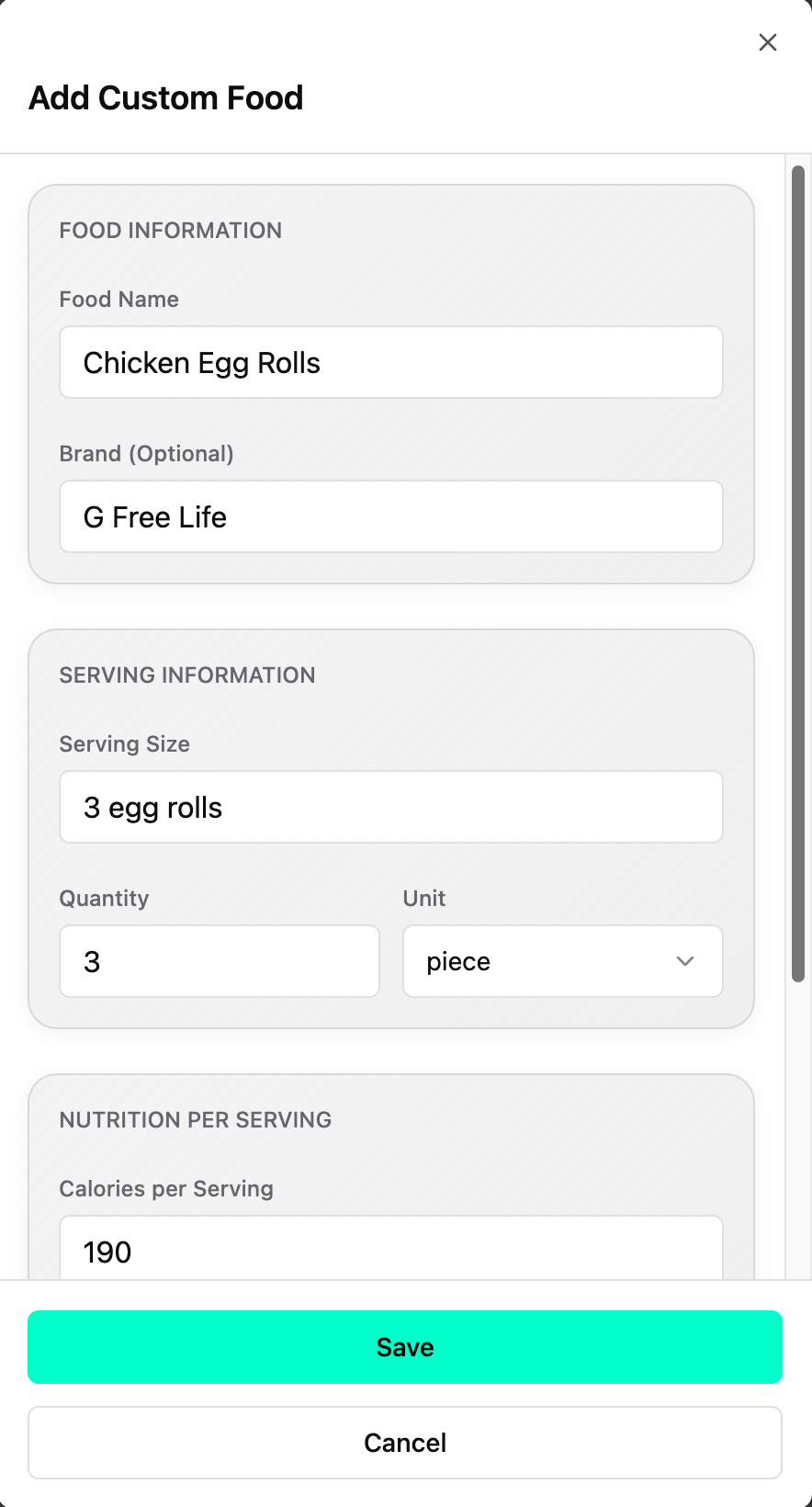
Custom Foods
After using Hyper Search and Barcode lookup, if you still can't find the food item, you can create it! On the Meals page, just click the + button in the top right corner and choose "My Custom Foods". Here you can see and edit your custom foods, and add new ones.
Custom Recipes
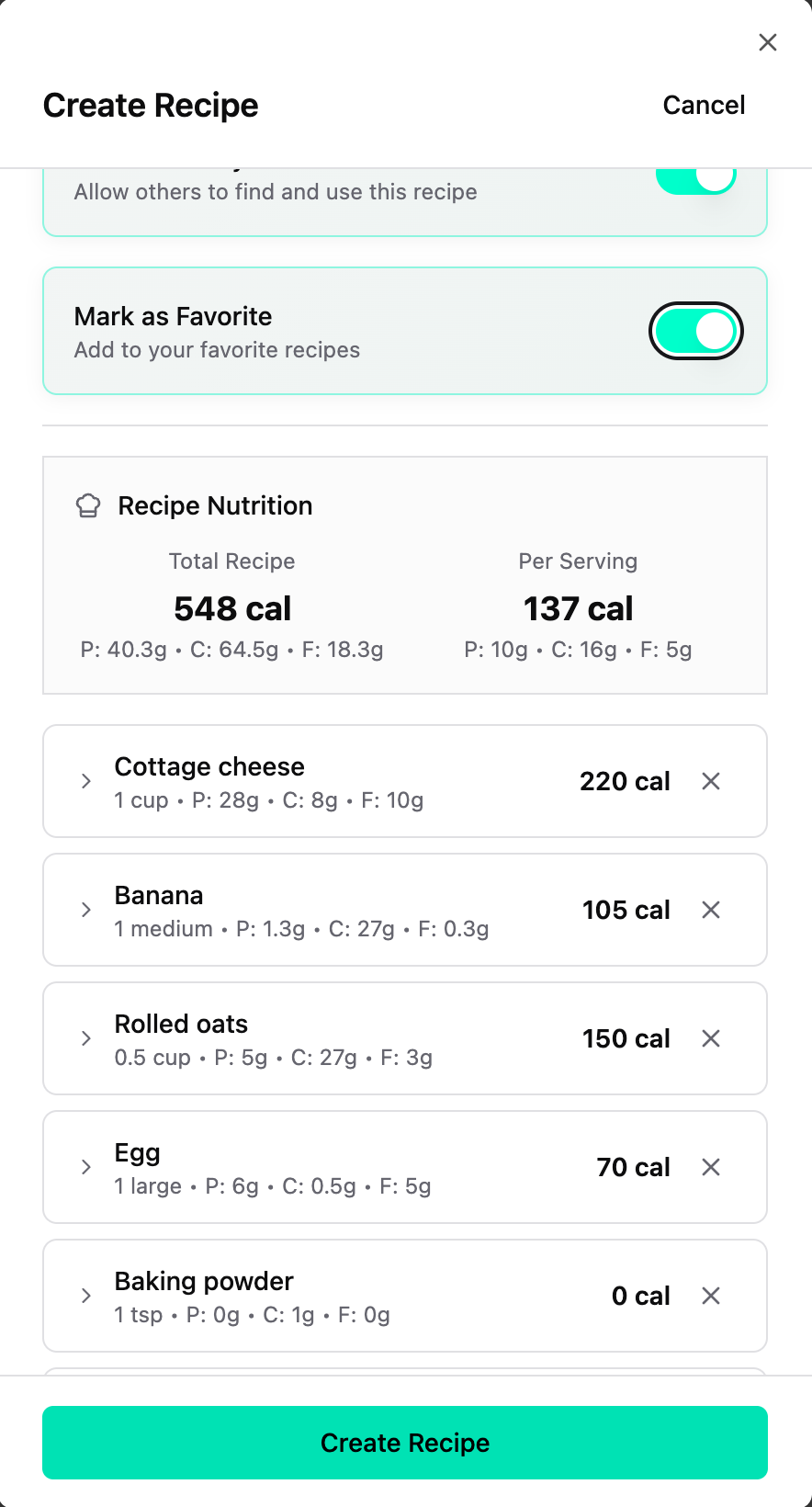
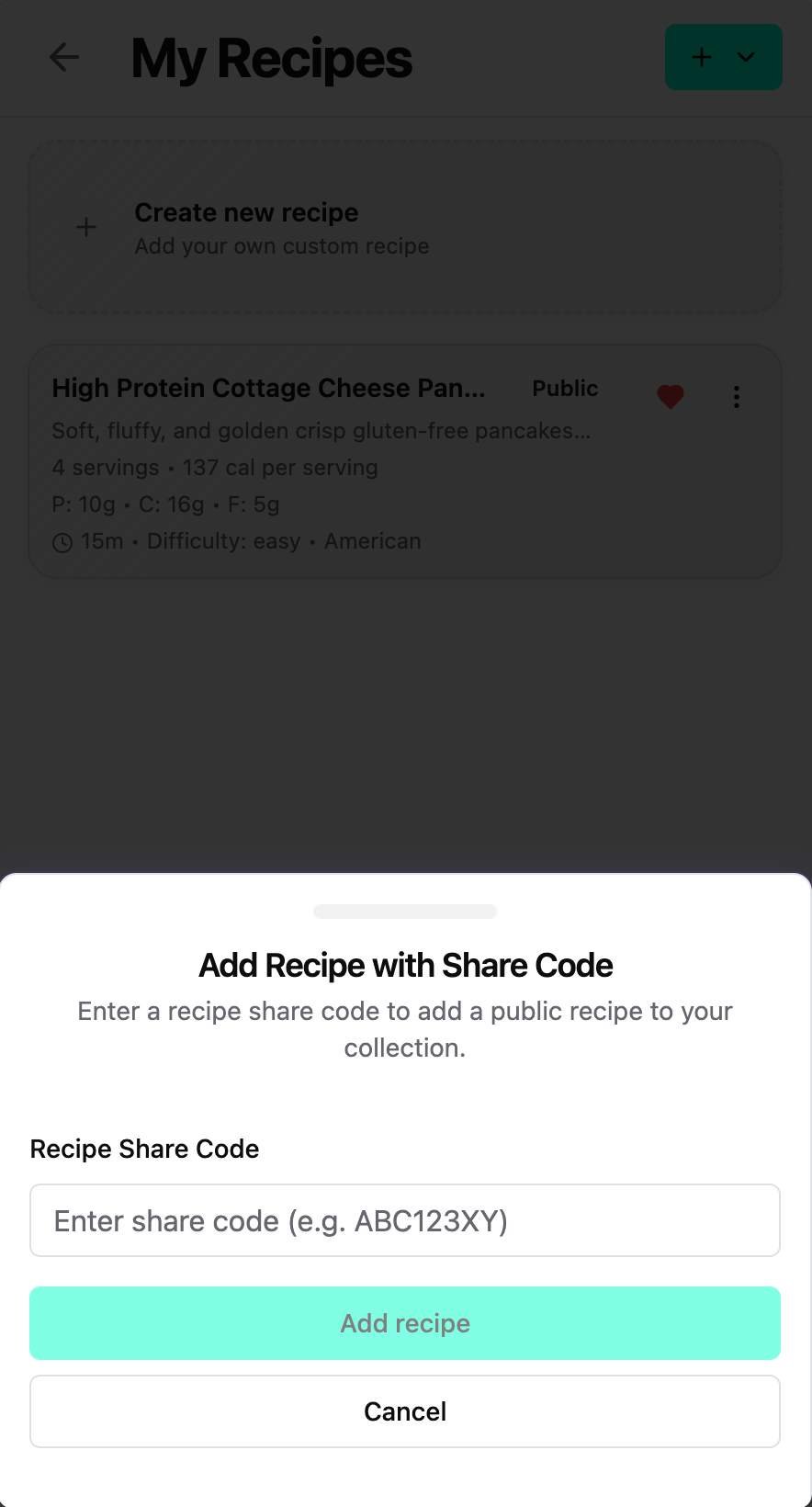
Want to create a recipe out of multiple food items? You can now create it manually, or you can simple paste a link to a web page with that recipe and it will be added automatically. Give your recipe a number of servings, and when you add it to a meal, you'll automatically get 1 serving.
Recipe sharing
After you've created a recipe enable "Share publicly" and then generate a recipe code. Give this code to any friend that uses Hypertrophy Pro, and they can paste it on the Recipes page to get access to your recipe.
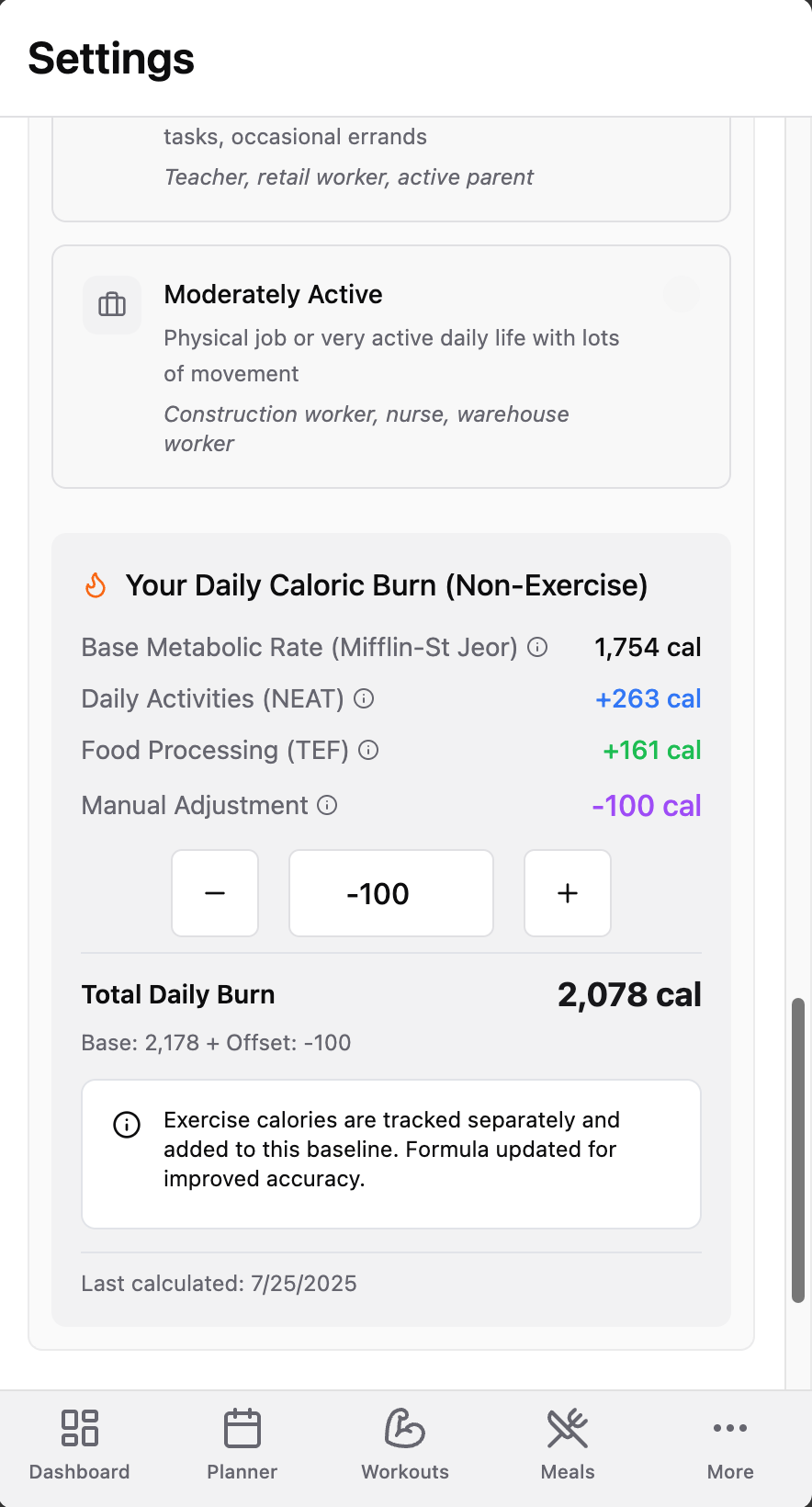
TDEE adjustment
TDEE figures don't seem right? Head to Settings and go to the Personal Details section. Here you can offset the base TDEE figure by a positive or negative integer to fine tune the TDEE calculation to match your personal caloric burn rates.
Analysis pages
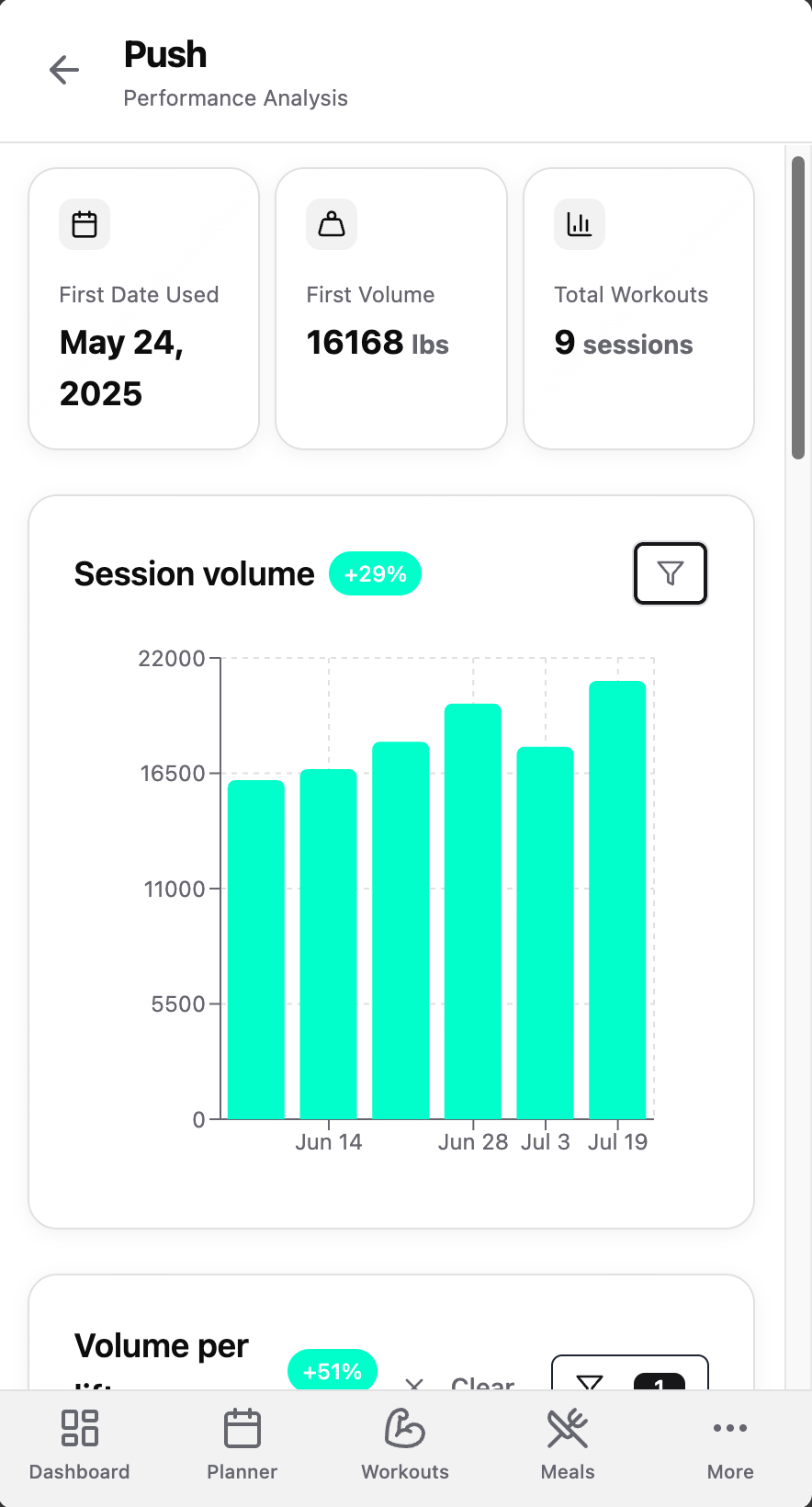
The analysis page is a collection of shortcuts that allow you to analyze your progress in various metrics. Are you getting stronger? Are you getting leaner?
• Brand New Template Analysis and Exercise Pages: Analyze your strength and volume gains by reviewing exactly how your activity has changed over time in each template and exercise. Our new charts allow you to filter by exercise, and by date range, allowing you to see progress during your last cut, bulk, or maintenance cycle.
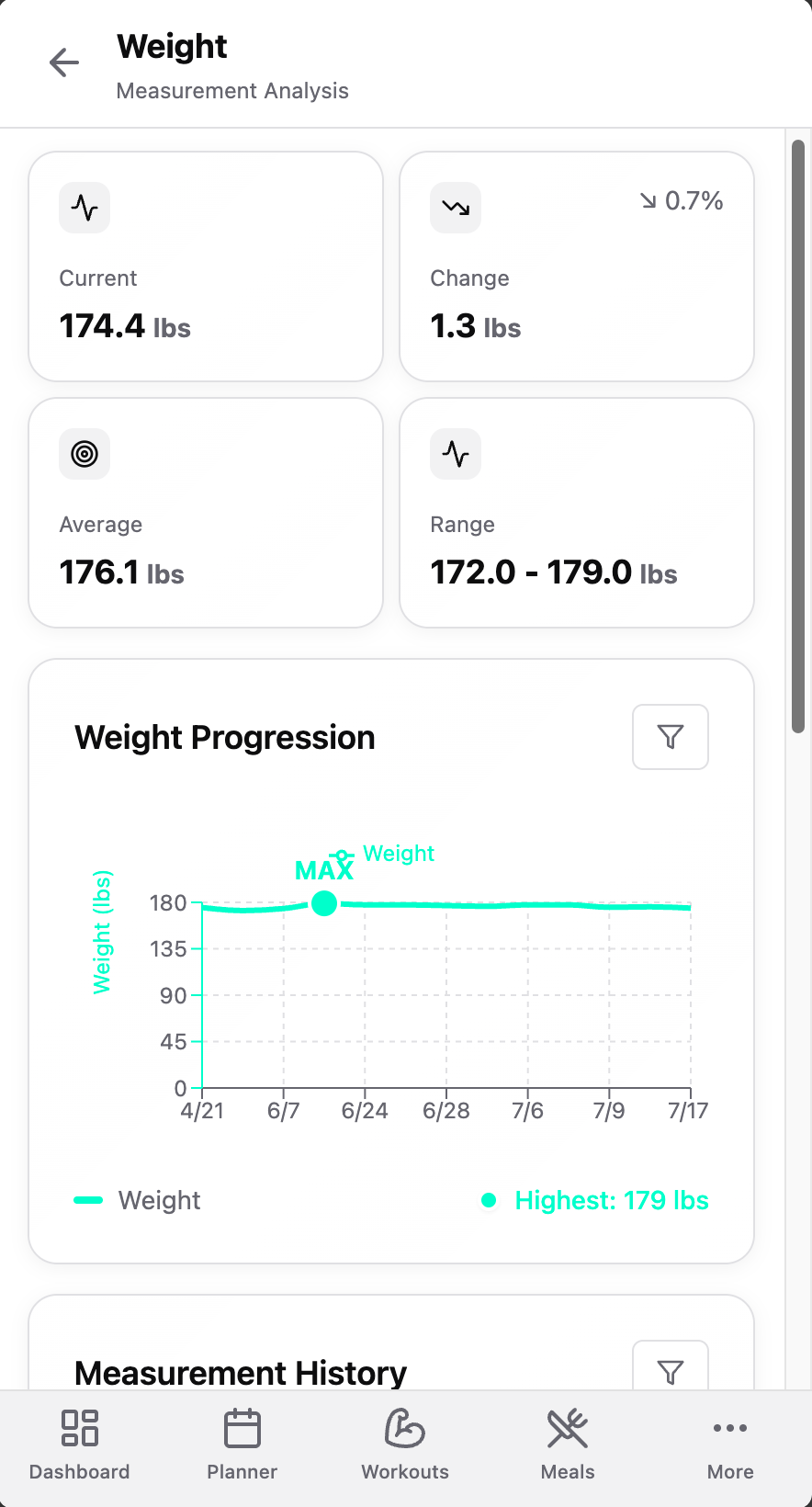
• Brand New Measurement Analysis Page: Review your progress in measurements like weight and waist. View your progress in a specific window of time by adjusting the chart or table's start and end dates.
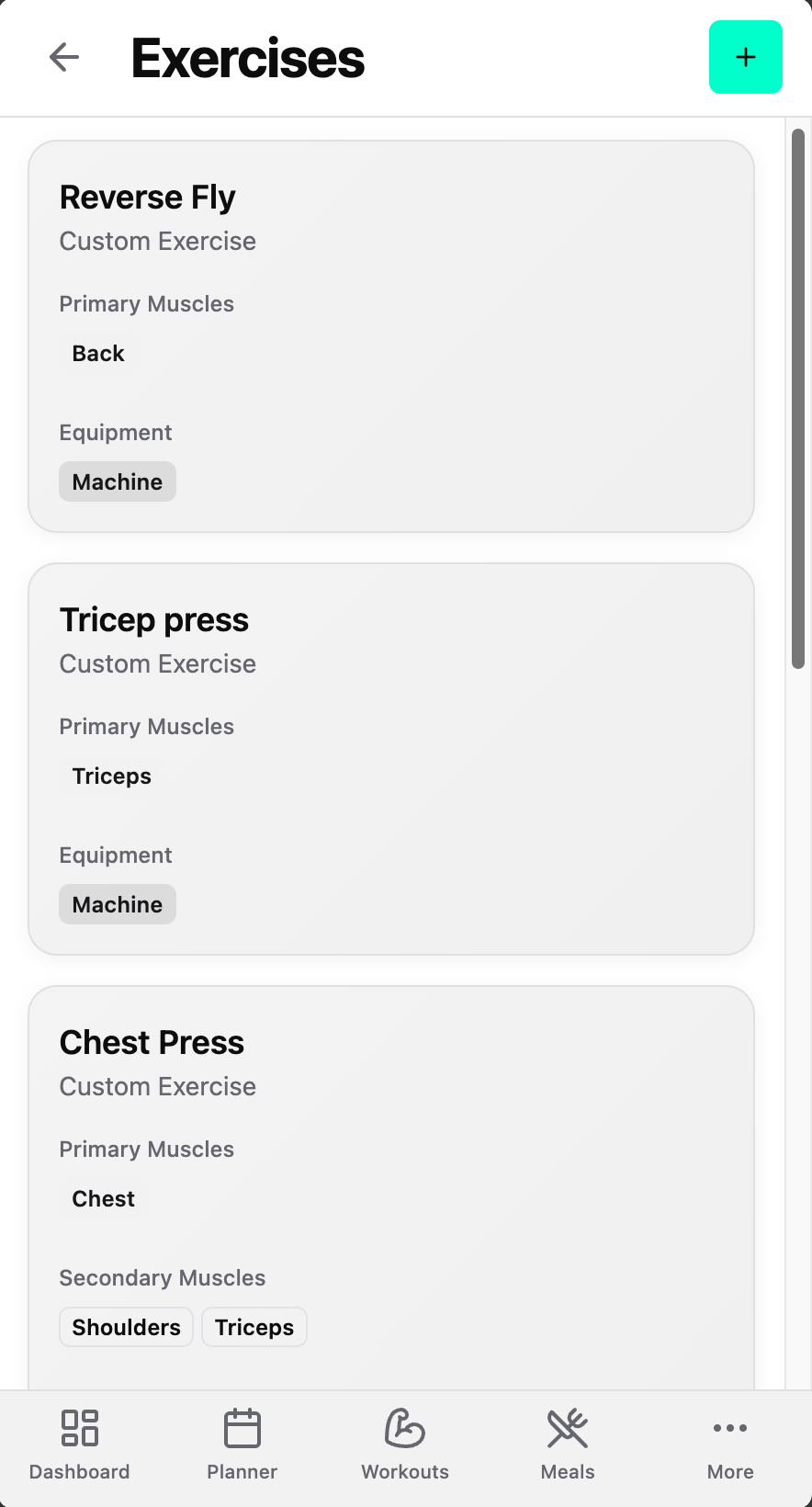
Custom Exercises Page
Edit your custom created exercise. Go to the Workouts page and click on the Exercises button at the top of the screen. Here you can see exercises you've created in the past and make changes to them.
COMING SOON
- •Cycle tracking: Allows female lifters track performance and weight fluctuations in relation to their cycles.
- •Training Program: Set up strength and weight change goals, set a timeline, and set your calorie and macro targets based on your goals, then measure your progress over time.
- •Caloric Balance and Macronutrient Intake Analysis
- •Much more!